
AisleFinder In-store navigation
Help customers find products in your store.
Search by product or by department, see a detailed location, and follow the route to the product on a 3D store map.
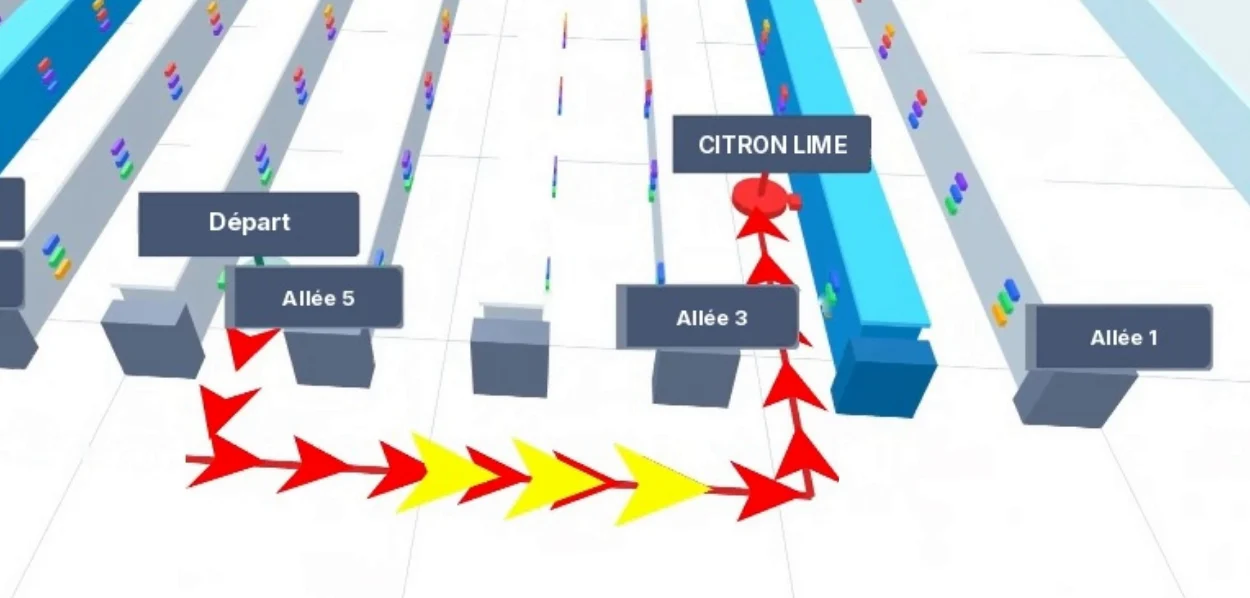 3D map
How it works
Search, locate, go.
The customer searches for a product, checks its location, then sees the route on the store map. A route can also link several products, such as the items on a shopping list.
Search for a product
By name, by department, or from a photo of a list.
Check its location
Floor, aisle, side, shelf: depending on the information entered.
See the route
Arrows show the way on the 3D store map.
The video shows a shopping list uploaded as an image, a search by department and then by section, and a product’s location card.
The video shows the app’s French-language interface.
Search
Three ways to find a product.
Each customer chooses what suits them: type a name, browse the store, or start from a list.
By product name
The customer types the product name and checks the results.
By department or section
They browse the departments, then their sections, without typing anything.
From a photo of a list
They upload a photo of their shopping list: the text read from the image fills in the search field.
Location
A location that is easy to read.
For each product, AisleFinder can display a detailed location: the aisle, the side, the stand and the shelf.
This level of detail depends on the information the store enters for each product.
Aisle A89Left sideStand 2Shelf 1
Your store
A map built for your store.
The 3D map represents your store. It is prepared with you, based on your floor plan and the layout of your departments.
- Departments and zones
- The store’s departments, sections and zones are shown on the map.
- Fixtures and locations
- A configuration tool lets you place each element and set its position, dimensions, color and orientation.
- Support
- EZad helps you prepare the map and link your products to their locations.
Your project
Plan your project with EZad.
Accurate, up-to-date product data makes the locations shown more reliable.
Review
Together, we review the store floor plan and the data available.
Prepare
We prepare the map and match products to their locations.
Check
We check the routes on a defined demo area.
What data do we need to prepare?
The store floor plan, how departments and zones are organized, and the list of products with their locations. We review the data you already have with you.
How precise can a location be?
Down to the shelf, for example: aisle A89, left side, stand 2, shelf 1. The level of detail depends on the information entered for each product.
How is the map adapted to the store?
The map is configured from your store floor plan: departments, zones, fixtures and locations are placed and sized on it. EZad helps you with this preparation.
How do we arrange a demo?
Contact us and tell us about your store and your project. We will show you AisleFinder and work out together what information is needed to adapt it to your store.
Demo
Let’s see how AisleFinder can fit your store.
Tell us about your store and your product data: we’ll show you the search, the product locations and the 3D map.