Digital signage
Create your content and schedule it on your screens.
With Toucan®, combine posters, images, videos and documents into playlists, then choose the screens and times for playback. EZad helps you set up the solution.
Toucan content examples
Content tailored to your screens.
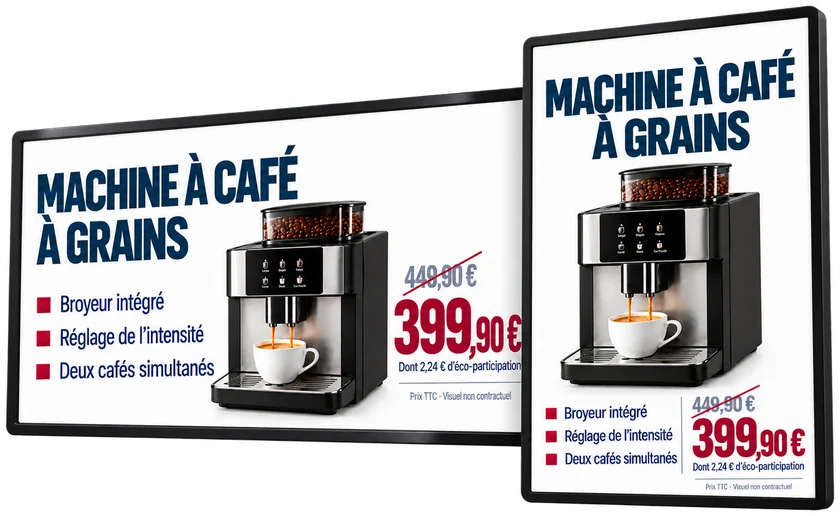
Each piece of content is laid out for the format of the screen that plays it. Play the examples to watch the elements appear, then the complete poster stay on screen.
Animation for a landscape screen, in French: the title “Machine à café à grains” (bean-to-cup coffee machine), a photo of the machine, the price of €399.90 instead of €449.90 including €2.24 eco-contribution, then three features: built-in grinder, adjustable strength, two coffees at once.
Animation for a portrait screen, in French: the same product laid out vertically, with the title at the top, the machine in the center, the three features, then the price of €399.90 instead of €449.90 including €2.24 eco-contribution.
Playlists
Bring your content together in one playlist.
A playlist can mix your videos, images, PDF documents and PowerPoint presentations.
Posters from your catalogs can be animated for the screen. Templates created in Toucan® can also be animated.
One playlist, several types of content
- Toucan posterscatalogs and templates, animated
- Images
- Videos
- PowerPoint
Scheduling
Schedule your content.
From playlist to screen, you decide what plays, when and where.
Your content
Bring together the content you want to display.
Your schedule
Set its order, duration and playback periods.
Your screens
Choose the screens it plays on.
Two ways to schedule
Manual scheduling
You choose the start and end dates, the days of the week and the time slots for playback.
Automatic scheduling
Your playlist schedule is prepared from the days and times defined during setup.
With VNC Viewer, remotely view what your screens are displaying, in real time.
Setup and support
Setup and support from EZad.
Screens and players: EZad can supply the hardware or check the compatibility of your existing equipment.
- Needs and equipment review
- We review your content, your screens and your playback needs, and check the compatibility of the equipment already in place.
- Installation and configuration
- EZad’s support team installs and configures Toucan® along with your display equipment.
- Staff training
- Our training team helps your staff get started with the solutions.
- Free helpline
- Beyond installation, a free helpline supports all our customers Monday to Friday.
What content can you display with Toucan®?
A Toucan® playlist can combine videos, images, PDF documents and PowerPoint presentations. It can also include animated posters from your catalogs and templates created in Toucan®, then animated.
Can Toucan® posters and templates be animated?
Yes. Posters from your catalogs can be animated, as can templates previously created in Toucan®. This animated content then goes into your playlists alongside your other media.
Can you choose playback dates, times and screens?
Yes. With manual scheduling, you choose the order and duration of each item, the start and end dates, the days of the week, the time slots and the screens concerned. An automatic mode can also prepare the schedule from the days and times defined during setup.
Can you remotely see what is showing on a screen?
Yes. With VNC Viewer, you can remotely view what your screens are displaying, in real time.
Can EZad supply and configure the equipment?
Yes. EZad can supply screens and players, or work with your existing equipment once its compatibility has been checked. EZad’s support team installs and configures Toucan® along with your display equipment. Our training team helps your staff get started with the solutions, and a free helpline supports all our customers Monday to Friday.
Toucan® demo
Let’s talk about your content and screens.
Tell us about your content, your equipment and your playback needs. We’ll show you how to organize your digital signage with Toucan®.