Print signage and POP materials
Your in-store posters, ready to print in the formats you need.
With Toucan®, create price posters, promotional signs and labels from your catalogs or product information. Prepare materials suited to your retail brand, then print them on your printers and plotters.
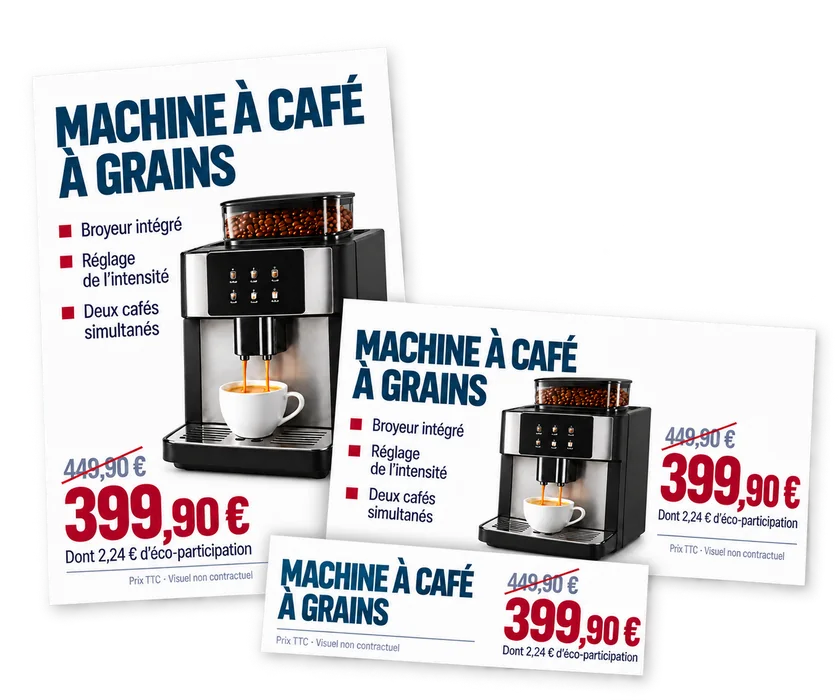
Toucan examples
One product, several display materials.
The same product information can be adapted to different display materials without re-entering everything: posters, small posters, shelf labels and banners reuse the same name, selling points and price.
Example layouts: many other formats are possible, depending on your templates and display materials.
From catalog to print
Choose, generate, print.
Choose the products
From the catalog, work by product, select several products on the same page or generate posters by department, as needed.
Generate the posters
Toucan prepares the posters in the formats set by your templates, with the product information.
Print
Select the formats and the number of copies, then start printing.
Other creation modes are also available: from a product barcode number (Gencod), guided entry and free-form creation.
Explore Toucan® creation modesThe screenshots show Toucan’s French-language interface.
Data and brand guidelines
From product information to your brand’s display materials.
Toucan reuses the information available and places it in your retail brand’s templates. Teams prepare the materials for a promotional campaign without starting from scratch.
- Your product data
- Toucan uses your catalogs and product databases, and connects to ERP and back-office systems, such as Aladin, Abaco and Gestmag. The connection is defined according to your technical environment and the data available. Product images can be used when they are available and accessible in the data source.
- Themes and templates
- Themes reflect your price mechanics and your retail brand’s guidelines: regular price, instant discount, deferred benefit or multi-buy offer.
- Guided entry
- Entering a Gencod can prefill the product information, and the poster preview updates as you type. Alerts flag required fields that have not been filled in, such as legal notices or product origins.
- Promotional campaigns
- The materials for a campaign are prepared from the same information and the same templates, then adapted to the intended formats.
- User permissions
- Each user has access to the features, templates and content set for their profile.
Printing and support
Print in store, on your own equipment.
Posters are printed directly from Toucan on the printers and plotters configured for the store. EZad installs the setup and supports your teams.
Printing
- Direct printing on the printers and plotters configured for the store.
- The formats available depend on your templates and on the capabilities of your equipment.
- EZad can supply printers and plotters, or work with your existing equipment once its compatibility has been checked.
EZad support
- EZad installs and configures your solutions and your printing devices.
- Our training team helps your staff get started with the solutions.
- Beyond installation, a free helpline supports all our customers Monday to Friday.
Your campaigns can also run on in-store screens: digital signage.
What data do you need to create posters with Toucan®?
Toucan® can use a catalog, a product database or data from an ERP or back-office system, such as Aladin, Abaco or Gestmag, when available. The connection depends on your technical environment and the data available. Product images can be used when they are available and accessible in the data source. Guided entry and free-form creation also make it possible to create materials without a direct connection to a product database.
Which formats can you print with Toucan®?
Many formats are possible: A-series sizes, small label formats, large posters and formats adapted to your displays. The formats offered depend on the templates set up for your retail brand and on the capabilities of the configured printers or plotters.
Can you prepare posters for several products at once?
Yes. From a catalog, you can select several products on the same page to prepare a poster for each of them, or generate posters for the departments you select. You then choose the formats and the number of copies before printing.
What equipment are the posters printed on?
Users print directly from Toucan® to the printers or plotters configured for their store. EZad can supply printers and plotters, or work with your existing equipment once its compatibility has been checked.
What support does EZad provide for print signage?
EZad’s support team installs and configures Toucan® along with your printing devices (printers, plotters). EZad also integrates your data and designs your templates. Our training team helps your staff get started with the solutions. Beyond installation, a free helpline supports all our customers Monday to Friday.
Toucan® demo
Show us your print materials.
Show us your posters, your product data and your printing equipment, and we will show you how to prepare and print them with Toucan®.