
 Point-of-sale communication software
Toucan®: create in-store posters and screen content from the same product data.
Create posters, POP materials and labels, print the formats you need and schedule content on your screens. Toucan adapts to the way your store or network works.
Toucan in action
Four ways to create your posters.
Choose the mode that fits your data and the freedom you give your teams. Toucan works with a catalog, a product database or data from an ERP or back-office system. Guided entry and free-form creation also work without a direct connection to a data source.
Choose a creation mode
Interactive catalog
Generate posters from a catalog by product, by selecting several products on the same page, or by department. Choose the formats you need, then print.
Catalog mode options
By product: Click a product in the catalog to generate its poster in the available formats.
Many formats available: A-series sizes, small label formats, large posters and formats adapted to your displays. The formats offered depend on the templates set up for your retailer and on the equipment configured.
The screenshots show Toucan’s French-language interface.
Print and screens
One foundation for posters and screens.
Teams work from the same templates and the same information, then choose the right output for each store. One message can be adapted to several formats without recreating all the content.
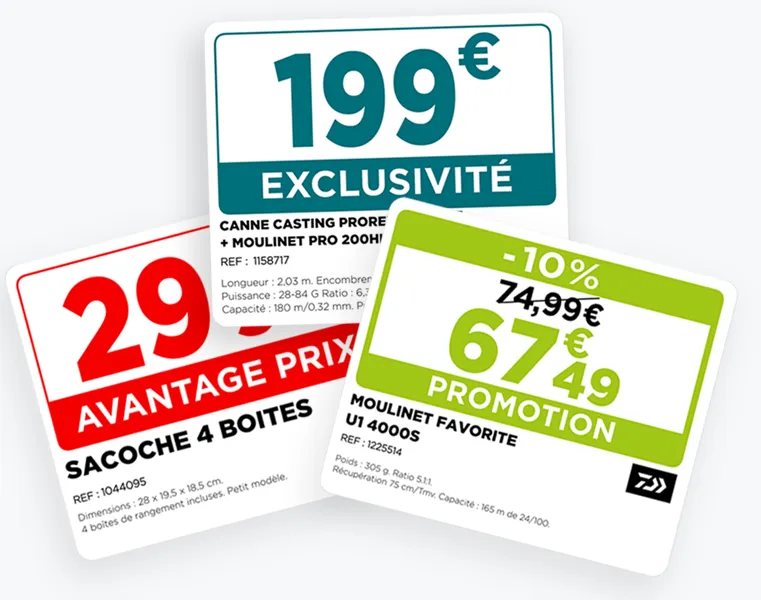
Printed materials
- Posters, POP materials, in-store information displays, price labels and shelf talkers
- Direct printing on A4 or A3 printers or on plotters
- Formats defined according to each retailer’s needs
In-store screens
- Content for screens and playlists
- Scheduling by screen, period or store
Headquarters and stores
Headquarters set the framework, stores produce.
From independent stores to multi-site networks, Toucan shares the work according to your rules, without requiring headquarters to produce every display on behalf of the stores.
Headquarters, central purchasing or communication team
- Make approved templates and campaigns available
- Organize campaigns around the retailer’s themes and templates
- Assign the features, templates and content available to each user profile
- Centralize data sources and protect your brand identity
Stores
- Choose the right product, template or display
- Adapt approved information without re-entering the campaign
- Print directly in the intended format
- Schedule content on authorized screens
Setup
Connections, installation and hosting.
- Your product data
- Toucan connects to ERP and back-office systems, such as Aladin, Abaco and Gestmag. It can also use a catalog or a product database. The connection is defined according to your technical environment and the data available.
- Installation or hosting
- Toucan is installed on your premises or hosted by EZad, depending on your project.
- Hardware
- EZad can supply printers, plotters, screens and players, or work with your existing equipment once its compatibility has been checked.
EZad support
A solution configured for the way you actually work.
EZad supports your project from needs analysis through to deployment.
- Installation and configuration
- EZad’s support team installs and configures your solutions: users, permissions, product sources, printing and display devices.
- Templates
- Design and integration of templates suited to print and screen media.
- Training
- Our training team helps headquarters, communication and store teams get started with the solutions.
- Free helpline
- Beyond installation, a free helpline supports all our customers Monday to Friday.
How can you create an in-store poster with Toucan®?
Toucan® offers four creation modes: from a product catalog, from a product barcode number (Gencod), with guided entry in a template, or in free-form mode. The software can create in-store posters, POP materials or labels depending on each store’s needs.
Is a product database required to use Toucan®?
No. Toucan® can use a catalog, a product database or data from an ERP or back-office system, such as Aladin, Abaco or Gestmag, when available. Guided entry and free-form creation also allow teams to produce materials without a direct connection to a product database.
Can Toucan® print all required formats?
Yes. Templates can be created in the formats required by your organization. Users print directly from Toucan® to the printers or large-format plotters configured for their location.
Can print signage, POP materials and in-store screens be managed in the same software?
Yes. Toucan® can create and print posters, POP materials and labels, while also preparing, organizing and scheduling digital signage content for in-store screens. It supports both print signage and screen-based communication.
Is Toucan® suitable for a multi-site network?
Yes. Headquarters can define templates, campaigns, permissions and shared content, while each store keeps the approved level of autonomy to adapt, print or publish its materials.
Do users need graphic design skills to use Toucan®?
No. Product catalogs, product code entry and guided entry make it possible to produce materials without mastering design software. Free-form creation is available for users who need greater flexibility.
What support does EZad provide with Toucan®?
EZad’s support team installs and configures Toucan® along with your printing devices (printers, plotters) and display devices (screens, players). EZad also integrates your data and designs your templates. Our training team helps your staff get started with the solutions. Beyond installation, a free helpline supports all our customers Monday to Friday. For hardware, EZad can supply printers, plotters, screens and players, or work with your existing equipment once its compatibility has been checked.
Who publishes the Toucan® software?
Toucan® is published by EZad, a French B2B software company based in Toulouse that specializes in point-of-sale communication software for retailers and store networks.
Is EZad’s Toucan® related to Toucan Toco?
No. Toucan® is the point-of-sale communication software published by EZad. Toucan Toco is a business intelligence platform published by another company, with no connection to EZad.
Toucan® demo
See Toucan® with your own materials.
Show us your materials, product data, equipment and how your network operates. We will show you how Toucan® can adapt to them.